

Planning a trip in 2026 is easier than ever, thanks to modern travel apps. Whether you’re planning a weekend getaway, a business trip, or a month-long international adventure, the right apps can save time, reduce travel costs, improve safety, and make every journey more enjoyable.
Instead of carrying paper maps, printed tickets, guidebooks, and currency conversion charts, today’s travelers only need a smartphone. From booking flights and hotels to translating foreign languages and navigating unfamiliar cities, travel apps have transformed the way people explore the world.
However, with thousands of travel apps available on Android and iPhone, choosing the right ones can be overwhelming. Some apps specialize in finding cheap flights, while others focus on hotel bookings, itinerary planning, offline navigation, or expense tracking.
This comprehensive guide highlights the 15 best travel apps for travelers, comparing their features, advantages, disadvantages, and ideal use cases. Whether you’re a solo backpacker, a family vacationer, a digital nomad, or a frequent business traveler, you’ll find apps that make your next trip smoother and more affordable.
Why Every Traveler Should Use Travel Apps
Travel apps have become essential tools because they help travelers:
- Save money on flights and accommodations
- Discover local attractions
- Navigate without getting lost
- Translate foreign languages instantly
- Track travel expenses
- Organize bookings in one place
- Find restaurants and activities nearby
- Access maps even without an internet connection
- Receive real-time travel updates
Using the right apps before and during your trip reduces stress and helps you spend more time enjoying your destination.
How We Selected These Apps
To create this list, we evaluated dozens of popular travel apps using the following criteria:
- Ease of use
- User ratings and reviews
- Global availability
- Offline functionality
- Security and privacy
- Value for money
- Regular updates
- Useful features for different types of travelers
Our goal was to recommend apps that provide genuine value for travelers rather than simply listing the most downloaded apps.
To create this list, we evaluated dozens of popular travel apps using the following criteria:
- Ease of use
- User ratings and reviews
- Global availability
- Offline functionality
- Security and privacy
- Value for money
- Regular updates
- Useful features for different types of travelers
Our goal was to recommend apps that provide genuine value for travelers rather than simply listing the most downloaded apps.
Comparison Table of the 15 Best Travel Apps
| App | Best For | Offline Support | Free Version | Overall Rating |
| Google Maps | Navigation | Yes | Yes | ⭐⭐⭐⭐⭐ |
| Google Translate | Language Translation | Yes | Yes | ⭐⭐⭐⭐⭐ |
| Skyscanner | Cheap Flights | No | Yes | ⭐⭐⭐⭐⭐ |
| Booking.com | Hotels | Limited | Yes | ⭐⭐⭐⭐⭐ |
| Airbnb | Vacation Rentals | Limited | Yes | ⭐⭐⭐⭐☆ |
| Rome2Rio | Transportation Planning | No | Yes | ⭐⭐⭐⭐☆ |
| TripIt | Travel Itinerary | Limited | Yes | ⭐⭐⭐⭐⭐ |
| XE Currency | Currency Conversion | Yes | Yes | ⭐⭐⭐⭐⭐ |
| PackPoint | Packing Lists | Yes | Yes | ⭐⭐⭐⭐☆ |
| Uber | Ride Sharing | No | Yes | ⭐⭐⭐⭐⭐ |
| Hopper | Flight Price Prediction | No | Yes | ⭐⭐⭐⭐⭐ |
| Google Lens | Visual Search | Limited | Yes | ⭐⭐⭐⭐⭐ |
| AllTrails | Hiking | Yes | Yes | ⭐⭐⭐⭐☆ |
| Polarsteps | Travel Journal | Limited | Yes | ⭐⭐⭐⭐☆ |
| Splitwise | Expense Sharing | Limited | Yes | ⭐⭐⭐⭐⭐ |
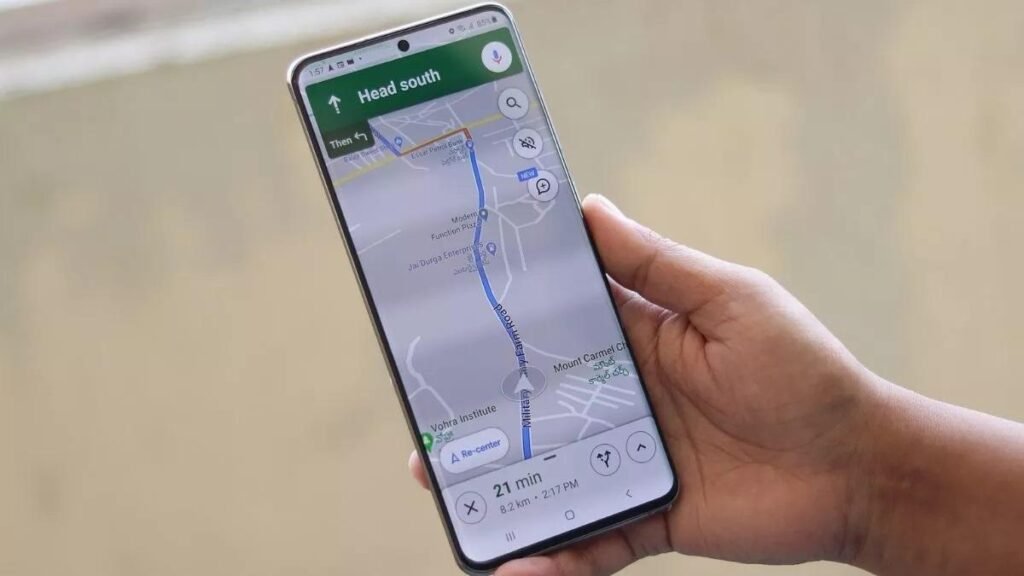
Google Maps
Best Overall Travel App
Google Maps is one of the most powerful travel tools ever created. It helps millions of travelers every day by providing accurate navigation, nearby attractions, restaurant recommendations, live traffic updates, and public transportation information.
Whether you’re exploring Tokyo, Paris, Dubai, New York, or Istanbul, Google Maps is usually the first app you’ll open.
Key Features
- Turn-by-turn navigation
- Live traffic updates
- Public transportation routes
- Walking directions
- Cycling directions
- Offline maps
- Street View
- Business reviews
- Restaurant recommendations
- Hotel locations
Pros
✔ Free to use
✔ Extremely accurate navigation
✔ Offline maps available
✔ Excellent restaurant reviews
✔ Supports almost every country
Cons
✖ Some business hours may be outdated
✖ Offline maps require downloading in advance
Best For
- Solo travelers
- Road trips
- Backpackers
- Family vacations
- City exploration
Expert Tip: Download offline maps before your flight so you can navigate even without mobile data.
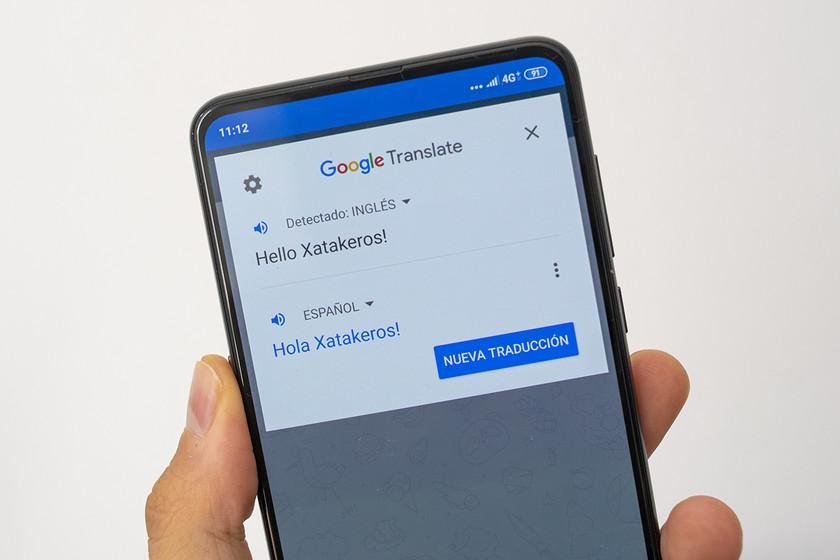
Google Translate
Traveling becomes much easier when you can communicate with local people.
Google Translate supports more than 100 languages and offers instant translations for text, speech, signs, menus, and conversations.
One of its most impressive features is Camera Translation, which lets you point your phone at a menu or street sign and instantly view a translated version.
Key Features
- Text translation
- Voice translation
- Camera translation
- Conversation mode
- Offline language packs
- Handwriting recognition
Pros
✔ Free
✔ Fast translations
✔ Offline support
✔ Supports many languages
✔ Easy to use
Cons
✖ Some translations aren’t perfect
✖ Slang and idioms may not translate accurately
Best For
International travelers visiting countries where they don’t speak the local language.
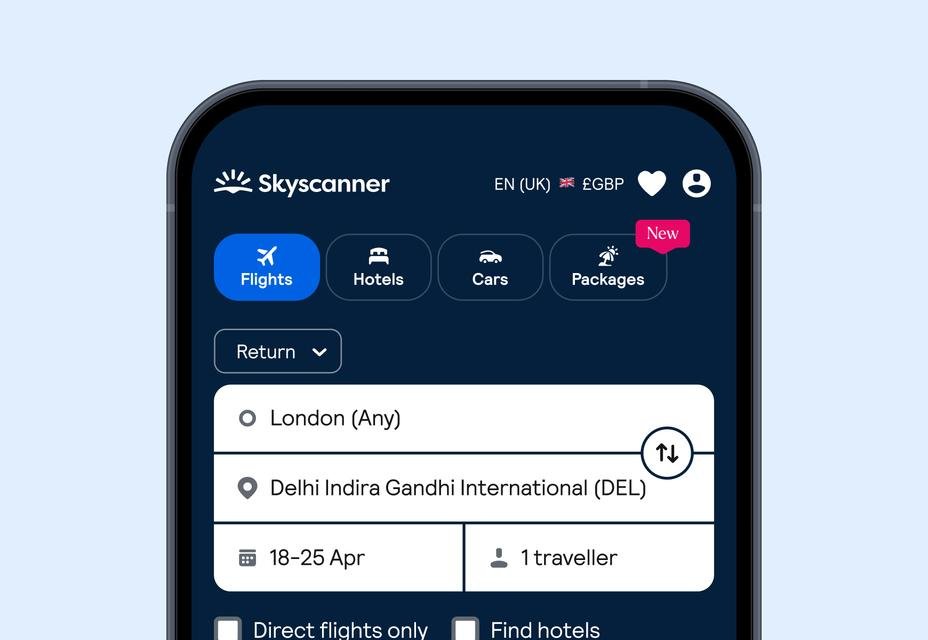
Skyscanner
Best App for Finding Cheap Flights
Airfare is often the biggest travel expense, and Skyscanner helps travelers compare prices across hundreds of airlines and booking websites.
Its flexible search options allow you to discover the cheapest travel dates and destinations.
Key Features
- Flight comparison
- Hotel comparison
- Car rentals
- Price alerts
- Flexible date search
- Multi-city booking
Pros
✔ Finds competitive flight prices
✔ Easy comparison tools
✔ Price alerts save money
✔ User-friendly interface
Cons
✖ Final prices may vary after redirecting to booking partners
✖ Some deals have limited availability
Best For
Budget travelers looking to save on airfare.
Booking.com
Best Hotel Booking App
Booking.com offers access to millions of accommodations worldwide, including hotels, apartments, resorts, hostels, villas, and guesthouses.
Its detailed reviews and flexible cancellation policies make it one of the most trusted accommodation platforms.
Key Features
- Hotels
- Resorts
- Apartments
- Villas
- Hostels
- Guest reviews
- Free cancellation (many properties)
- Mobile-only discounts
Pros
✔ Massive accommodation selection
✔ Transparent guest reviews
✔ Flexible booking options
✔ Frequent special deals
Cons
✖ Some destinations have higher service fees
✖ Popular hotels sell out quickly during peak seasons
Best For
Travelers who want flexibility and a wide range of accommodation choices.
Airbnb
Best for Unique Stays
Airbnb is ideal for travelers seeking more than a standard hotel room. Instead of traditional accommodations, you can stay in apartments, cottages, cabins, beach houses, or even treehouses.
It’s particularly useful for families, long-term travelers, and digital nomads who want extra space or kitchen facilities.
Key Features
- Entire homes
- Private rooms
- Unique stays
- Monthly discounts
- Local experiences
- Flexible booking options
Pros
✔ Spacious accommodations
✔ Great for families and groups
✔ Local living experience
✔ Kitchen access in many properties
Cons
✖ Cleaning fees can increase total cost
✖ Quality varies between hosts
Best For
- Families
- Remote workers
- Long-term travelers
- Group vacations
Rome2Rio
Best Travel App for Planning Transportation
When you’re visiting a new country, figuring out how to travel from one city to another can be confusing. Should you take a train, a bus, a ferry, or a flight?
Rome2Rio solves this problem by showing nearly every transportation option available between two destinations.
Whether you’re traveling from London to Paris, Bangkok to Phuket, or Tokyo to Osaka, the app compares different transport methods in one place.
Key Features
- Flight comparisons
- Train routes
- Bus schedules
- Ferry information
- Ride-sharing options
- Car rental suggestions
- Estimated travel times
- Estimated travel costs
Pros
✔ Combines multiple transportation options in one search
✔ Easy-to-understand route planning
✔ Saves time researching different websites
✔ Great for international travel
Cons
✖ Booking usually redirects to third-party websites
✖ Prices may change after clicking through
Best For
- Backpackers
- Multi-city travelers
- Europe rail trips
- Southeast Asia travel
- Long-distance travel planning
Expert Tip
Always compare both travel time and total cost. Sometimes a slightly more expensive train can save several hours compared to a bus.
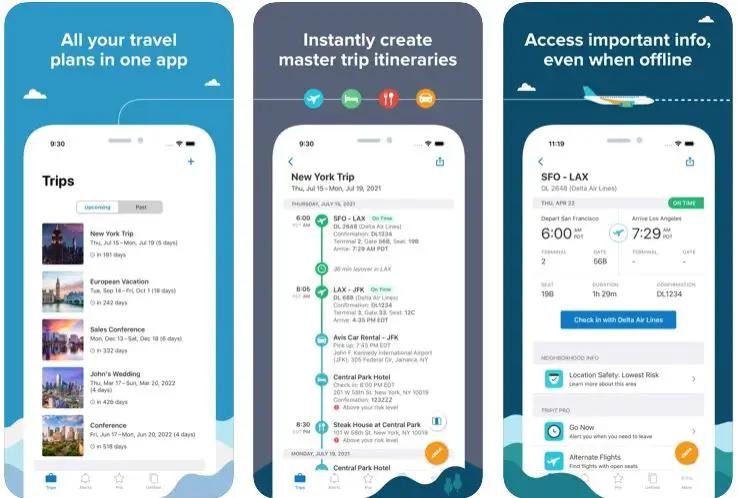
TripIt
Best Travel Itinerary Organizer
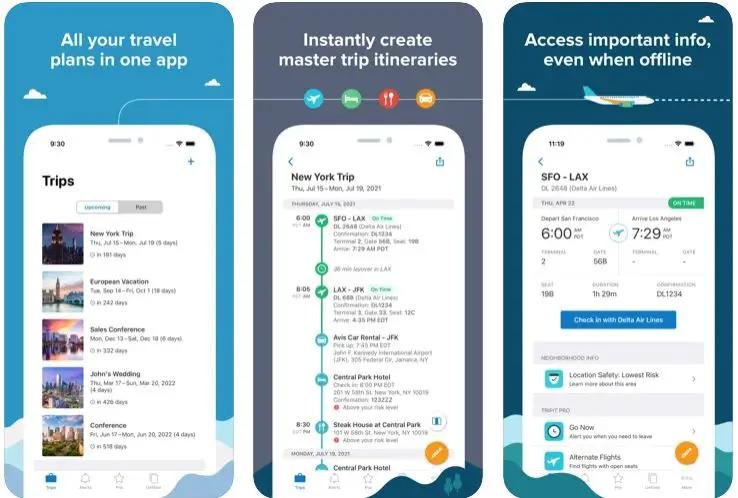
If you’ve ever searched through dozens of emails looking for a hotel confirmation or boarding pass, you’ll appreciate TripIt.
Instead of manually organizing your travel plans, simply forward your booking confirmations to TripIt, and it automatically creates a complete itinerary.
What TripIt Can Organize
- Flight tickets
- Hotel bookings
- Car rentals
- Cruise reservations
- Restaurant bookings
- Tours
- Activities
- Airport transfers
Everything appears in chronological order.
Key Features
- Automatic itinerary creation
- Calendar synchronization
- Flight tracking
- Travel reminders
- Offline itinerary access
- Multi-device syncing
Pros
✔ Keeps everything organized
✔ Easy to access during travel
✔ Saves time
✔ Excellent for business travelers
Cons
✖ Some advanced features require a premium subscription
✖ Flight notifications can occasionally be delayed
Best For
- Frequent travelers
- Business professionals
- Families
- International trips
XE Currency
Best Currency Converter for International Travel
Managing money abroad can be challenging, especially when you’re dealing with unfamiliar currencies.
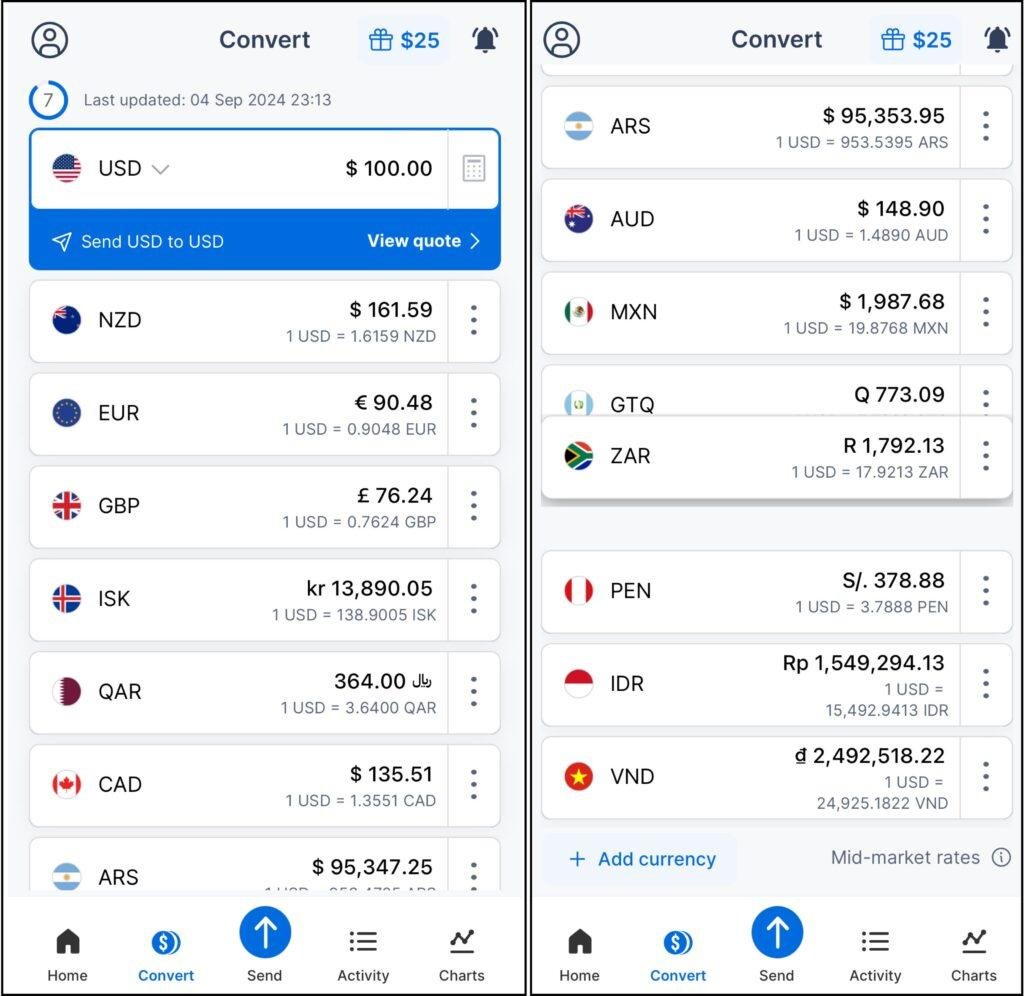
XE Currency is trusted by travelers worldwide for accurate and up-to-date exchange rates.
Instead of guessing conversion rates or relying on airport exchange counters, you can instantly calculate prices.
Key Features
- Live exchange rates
- Offline currency conversion
- Multiple currency tracking
- Historical exchange charts
- Currency calculator
Pros
✔ Accurate rates
✔ Offline functionality
✔ Fast conversions
✔ Easy interface
Cons
✖ Real exchange rates may differ slightly from your bank’s rates
✖ Advertisements appear in the free version
Best For
- International travelers
- Digital nomads
- Business trips
- Business trips
Money Saving Tip
Avoid exchanging money at airports whenever possible. Local banks or reputable exchange services often offer better rates.
PackPoint
Best Packing List App
One of the biggest travel mistakes is forgetting important items.
PackPoint creates personalized packing lists based on your destination, weather forecast, travel duration, and planned activities.
Instead of writing lists manually, the app builds one for you in seconds.
Example
If you’re visiting Switzerland for seven days during winter, PackPoint may recommend:
- Winter jacket
- Gloves
- Boots
- Thermal clothing
- Chargers
- Passport
- Medicines
- Travel adapter
If you’re traveling to Bali, the list changes automatically to include lighter clothing and beach essentials.
Key Features
- Smart packing lists
- Weather integration
- Activity-based suggestions
- Family packing lists
- Checklist reminders
Pros
✔ Saves packing time
✔ Reduces forgotten items
✔ Customizable
✔ Works offline
Cons
✖ Premium version unlocks extra customization
✖ Weather forecasts can change unexpectedly
Best For
- Family vacations
- Business trips
- International travel
- First-time travelers
Uber
Best Ride-Sharing App
Finding reliable transportation after landing at a busy airport isn’t always easy.
Uber allows travelers to request rides directly from their smartphones, avoiding language barriers and reducing the risk of fare negotiations.
Key Features
- Cashless payments
- Driver ratings
- Fare estimates
- Live vehicle tracking
- Airport pickup
- Ride sharing
- Safety features
Pros
✔ Convenient
✔ Transparent pricing
✔ Available in many countries
✔ Cashless travel
Cons
✖ Not available everywhere
✖ Surge pricing during busy hours
Best For
- Airport transfers
- City travel
- Night transportation
- Business trips
Safety Tips
- Always verify the driver’s name and vehicle details before entering.
- Share your trip with a trusted friend or family member.
- Sit in the back seat if traveling alone.
Comparison: Which App Should You Use?
| Need | Best App |
| Transportation between cities | Rome2Rio |
| Organizing bookings | TripIt |
| Currency conversion | XE Currency |
| Packing checklist | PackPoint |
| Local transportation | Uber |
Travel Apps by Traveler Type
Solo Travelers
Recommended Apps:
- Google Maps
- Google Translate
- Uber
- XE Currency
- TripIt
These apps help solo travelers stay safe, organized, and connected.
Family Travelers
Recommended Apps:
- Booking.com
- Airbnb
- PackPoint
- Google Maps
- TripIt
These apps simplify accommodation, packing, and itinerary management for families.
Backpackers
Recommended Apps:
- Skyscanner
- Rome2Rio
- XE Currency
- Google Maps
- Splitwise (covered in Part 3)
Backpackers benefit from affordable transport, navigation, and shared expense tracking.
Business Travelers
Recommended Apps:
- TripIt
- Uber
- Google Maps
- Booking.com
- XE Currency
These apps focus on efficiency and organization.
Expert Tips to Save Money Using Travel Apps
Using travel apps strategically can significantly reduce your travel expenses:
- Set price alerts on Skyscanner before booking flights.
- Compare hotels with vacation rentals to find the best value.
- Download offline maps before leaving home.
- Use XE Currency to avoid overpaying during currency exchanges.
- Share accommodation costs with friends or family when possible.
- Book transportation in advance during peak travel seasons.
- Keep digital copies of travel documents in a secure cloud service.
Hopper
Best Travel App for Predicting Flight Prices
Finding cheap flights isn’t just about comparing prices—it’s also about knowing when to book. Hopper uses historical pricing data and machine learning to predict whether flight prices are likely to increase or decrease.
Instead of guessing the best time to buy, Hopper gives you recommendations like “Buy Now” or “Wait”, helping you make informed decisions.
Key Features
- Flight price prediction
- Hotel booking
- Price alerts
- Flexible travel dates
- Fare freeze (available in some regions)
- Mobile-exclusive deals
Pros
✔ Predicts the best time to book flights
✔ Easy-to-understand interface
✔ Helps travelers avoid overpaying
✔ Real-time price alerts
Cons
✖ Predictions aren’t always perfect
✖ Some features depend on your region
Best For
- Budget travelers
- Students
- Families
- Frequent flyers
Pro Tip
Enable notifications so you’ll be alerted immediately when prices drop.

12. Google Lens
Best Visual Search App for Travelers
Google Lens is one of the most underrated travel tools. It lets you use your smartphone camera to identify objects, translate signs, scan menus, recognize landmarks, and even copy printed text.
Imagine standing in front of a menu written entirely in Japanese or Italian. Simply point your camera at it, and Google Lens translates it almost instantly.
Key Features
- Instant text translation
- Landmark recognition
- Plant and animal identification
- Restaurant menu translation
- QR code scanning
- Shopping search
Pros
✔ Completely free
✔ Very fast
✔ Excellent translation accuracy
✔ Helpful for sightseeing
Cons
✖ Requires a camera and internet for many features
✖ Recognition may struggle with poor lighting
Best For
- International travelers
- Food lovers
- Museum visitors
- Sightseeing tours
Expert Tip
Use Google Lens to identify famous buildings, monuments, and historical sites while traveling. It often provides quick background information without needing a separate search.
13. AllTrails
Best Hiking App for Adventure Travelers
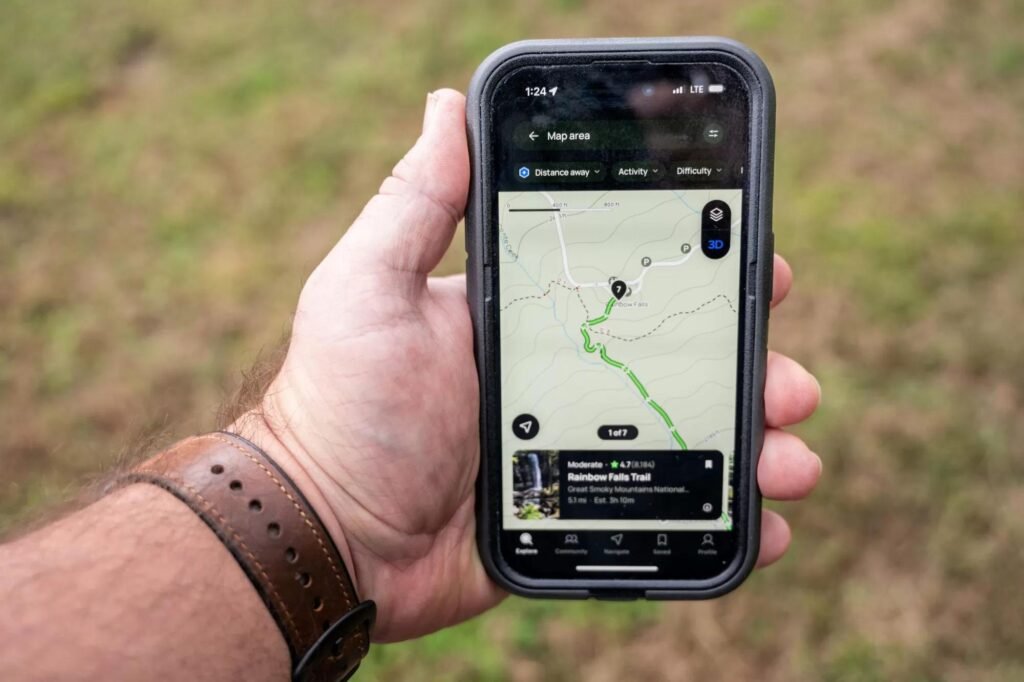
If you enjoy hiking, mountain trekking, or exploring national parks, AllTrails is an excellent companion. It offers thousands of trail maps with details on distance, elevation, difficulty, and user reviews.
Key Features
- GPS trail maps
- Offline trail downloads
- Difficulty ratings
- Elevation profiles
- User photos
- Trail reviews
Pros
✔ Great for outdoor adventures
✔ Community reviews provide useful insights
✔ Offline maps available
✔ Wide selection of trails
Cons
✖ Some advanced features require a subscription
✖ Coverage is stronger in certain regions than others
Best For
- Hikers
- Campers
- Nature lovers
- Adventure travelers
Safety Tip
Download your trail map before starting your hike, especially if you’ll be in an area with limited mobile coverage.
14. Polarsteps
Best App for Recording Your Travel Journey
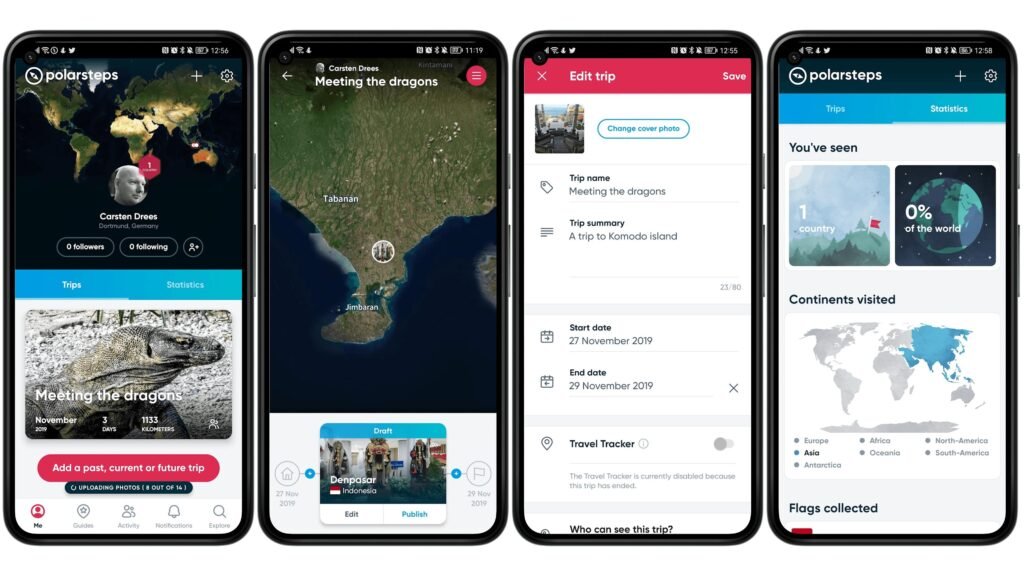
Every trip creates memories worth preserving. Polarsteps automatically tracks your journey and builds a beautiful digital travel journal with maps, photos, and notes.
Instead of posting every moment on social media, you can keep a private record of your adventures and share it later with friends or family.
Key Features
- Automatic route tracking
- Interactive travel maps
- Photo organization
- Digital travel diary
- Private or public sharing
- Offline tracking
Pros
✔ Creates a complete travel timeline
✔ Easy to use
✔ Great for long trips
✔ Attractive visual layout
Cons
✖ GPS tracking can use additional battery power
✖ Some customization options are limited
Best For
- Backpackers
- Solo travelers
- Long-term travelers
- Content creators
Pro Tip
Add short daily notes while traveling. Small details are often the first memories people forget after returning home.
15. Splitwise
Best Expense Sharing App for Group Travel
Traveling with friends or family is fun—until it’s time to split the bill.
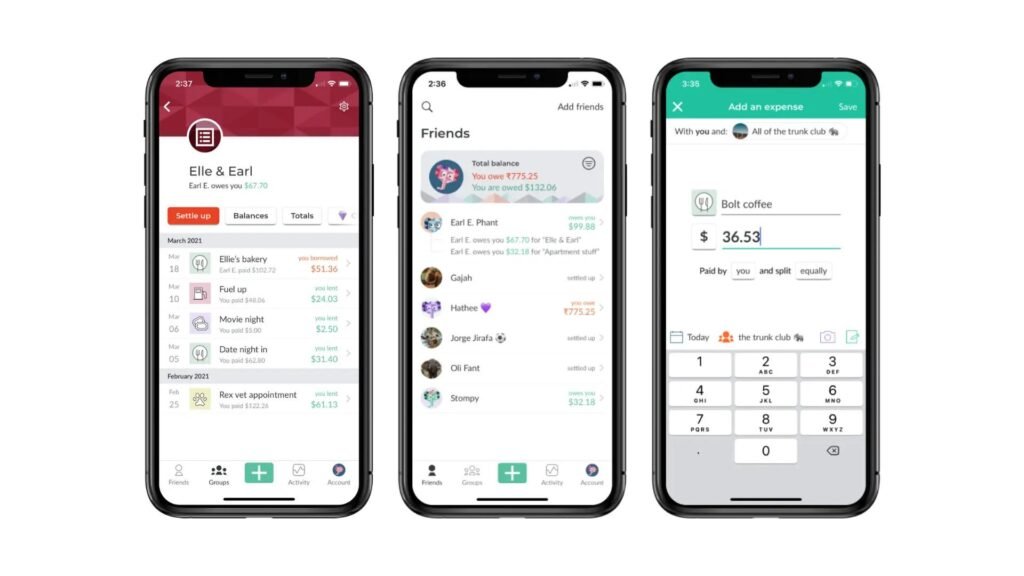
Splitwise keeps track of shared expenses, making it easy to see who paid for what and who owes money.
Whether you’re sharing hotel costs, restaurant bills, fuel, or attraction tickets, the app automatically calculates balances.
Key Features
- Shared expense tracking
- Group budgets
- Multiple currencies
- Payment reminders
- Debt summaries
- Simple reports
Pros
✔ Eliminates manual calculations
✔ Supports multiple currencies
✔ Excellent for group trips
✔ Easy-to-use interface
Cons
✖ Everyone in the group should use the app for the best experience
✖ It tracks expenses but doesn’t process payments in many regions
Best For
- Friends traveling together
- Family vacations
- Road trips
- Student travel groups
Example
Imagine four friends on a road trip:
- Sarah pays for the hotel.
- Ali pays for fuel.
- John buys dinner.
- Emma purchases attraction tickets.
Instead of calculating everything manually, Splitwise tracks all expenses and shows exactly how much each person owes.
Which Travel Apps Should You Install?
Not every traveler needs all 15 apps. Your ideal setup depends on your travel style.
| Traveler Type | Recommended Apps |
| First-Time Traveler | Google Maps, Google Translate, Booking.com, Skyscanner, PackPoint |
| Solo Traveler | Google Maps, Uber, TripIt, XE Currency, Google Lens |
| Backpacker | Skyscanner, Rome2Rio, Splitwise, AllTrails, Polarsteps |
| Family Vacation | Booking.com, Airbnb, PackPoint, Google Maps, TripIt |
| Business Traveler | TripIt, Uber, Google Maps, XE Currency, Booking.com |
| Adventure Traveler | AllTrails, Google Maps, Polarsteps, Google Lens |
Common Mistakes Travelers Make with Apps
Even the best travel apps can’t help if they’re not used correctly. Avoid these common mistakes:
1. Forgetting Offline Maps
Many travelers assume they’ll always have internet access. Download maps before your trip.
2. Ignoring Price Alerts
Flight prices can change quickly. Enable alerts so you don’t miss good deals.
3. Installing Too Many Apps
Choose only the apps you’ll actually use. Too many apps can clutter your phone and consume storage.
4. Skipping Updates
Keep your apps updated to benefit from new features, security improvements, and bug fixes.
5. Not Backing Up Travel Documents
Save digital copies of your passport, visa, travel insurance, and booking confirmations in secure cloud storage.
People Also Ask
What is the best travel app overall?
Google Maps is widely considered the best all-around travel app because it combines navigation, local business information, reviews, and offline maps.
Which app is best for booking cheap flights?
Skyscanner and Hopper are excellent options for comparing fares and tracking flight prices.
Which travel app works without the internet?
Google Maps, Google Translate, XE Currency, PackPoint, and AllTrails all offer useful offline features.
Which travel app is best for families?
Booking.com, Airbnb, PackPoint, and TripIt are especially useful for family vacations.
Are travel apps safe?
Most well-known travel apps use encryption and secure payment systems. Always download apps from official app stores and keep them updated.
Our Top Recommendations
Best Overall Travel App
🏆 Google Maps
Perfect for navigation, finding attractions, restaurants, and offline maps.
Best Flight Booking Companion
🏆 Skyscanner + Hopper
Use Skyscanner to compare fares and Hopper to monitor prices before booking.
Best Hotel Booking Platform
🏆 Booking.com
A huge range of accommodation options with detailed reviews.
Best for International Travelers
🏆 Google Translate
Break language barriers with text, voice, and camera translation.
Best for Group Trips
🏆 Splitwise
Makes sharing travel expenses simple and transparent.
Best for Adventure Lovers
🏆 AllTrails
Ideal for hiking, trekking, and exploring nature.
Essential Travel App Checklist
Before you leave home, make sure you:
- ✅ Install all the apps you’ll need.
- ✅ Sign in to your accounts.
- ✅ Download offline maps.
- ✅ Download offline language packs.
- ✅ Save hotel and flight confirmations.
- ✅ Back up your passport, visa, and travel insurance.
- ✅ Enable security features like two-factor authentication.
- ✅ Pack a power bank to keep your phone charged.
Frequently Asked Questions
What are the best travel apps for first-time travelers?
Google Maps, Booking.com, Google Translate, Skyscanner, and PackPoint are excellent choices for beginners.
Which app helps save money on flights?
Hopper predicts future airfare trends, while Skyscanner compares prices from multiple airlines.
Are free travel apps good enough?
Yes. Most travelers can rely on the free versions of Google Maps, Google Translate, Skyscanner, Booking.com, and XE Currency.
Can I use travel apps without internet access?
Many apps, including Google Maps, Google Translate, PackPoint, XE Currency, and AllTrails, offer useful offline features if you download the required data before your trip.
Which travel app is best for planning a complete trip?
TripIt is one of the best apps for organizing flights, hotels, activities, and reservations into one itinerary.
Final Thoughts
The right travel apps can simplify every stage of your journey—from finding affordable flights and booking comfortable accommodation to navigating unfamiliar streets, translating menus, tracking expenses, and preserving memories.
Instead of installing dozens of apps, choose the ones that match your travel style. A backpacker may prioritize Rome2Rio, AllTrails, and Splitwise, while a business traveler may benefit more from TripIt, Uber, and Booking.com.
Technology should support your travel experience, not complicate it. Spend a little time preparing before you leave, and you’ll enjoy a smoother, safer, and more organized trip.
Whether you’re planning your first adventure or your fiftieth, these travel apps can help you make the most of every destination.